Configuration
Spectops is configured from the measurement setup window.
- New setup: Creates a new measurement setup file and shows the setup configuration window.
- Open setup: Opens an existing measurement setup file and shows the setup configuration window before starting the measurements.
- Change setup: Opens the measurement setup window for the currently running setup.
Modifying the setup using these three commands will restart the measurements. That means that the visible data buffer is cleared.
For simple changes in the setup there is the quick setup option which will not restart the measurements but not all settings can be modified.
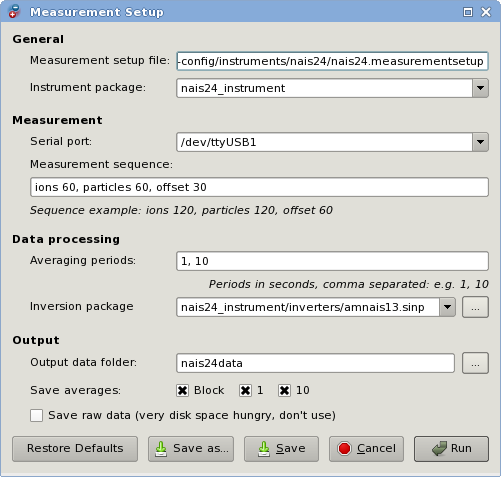
Spectops measurement configuration window.
-
Measurement setup file: The name of the measurement setup file. Instrument package, inversion package and output folder paths will be relative to the path of this file.
-
Instrument package: Path to the extracted instrument package folder. Usually named
(name)_instrument. -
Serial port: Serial port name where the instrument is connected. A drop-down list of available serial ports is presented, but it is not guaranteed that all ports are there. You may enter the name by hand.
-
Measurement sequence: Operating modes and respective duration in seconds as a comma separated list. For example
particles 120, ions 120, offset 60. -
Averaging periods: Comma separated list of averaging periods that should be generated in addition to block averages.
-
Inversion package: The file name of inversion matrix package that is used to produce the spectra. Usually it is in a subfolder of the instrument package folder.